Account Safety After a Gift Pack Purchase
A Whiteout Survival gift pack order ends with three published housekeeping steps: the team signs out and clears the login history on its side, you change the password, and you keep two-step verification reachable for next time. None of it is complicated, and all of it is described on the store's own pages.

Key takeaways
- After delivery the store signs out and clears the login history on its side, as published on the game pages.
- The advice for the buyer is to change the password once the delivery is confirmed and to keep two-step verification reachable.
- If a code is requested during an order, it should be passed through the order chat only.
- Whiteout Survival orders are login top-ups delivered usually within 10 to 30 minutes, with live chat staffed 24/7.
What happens on the store's side
The published sentence is short: we sign out and clear the login history on our side. In plain terms, the session created to buy the gift pack is closed once the purchase is done, and the record of that sign-in is wiped from the account's device list rather than left sitting there for the next person who opens the settings screen.
That matters because the order is a login top-up. KeyGold signs in to your account and buys the pack inside the game's own shop, which is the only way to reach the items a purchase driven by a player identifier cannot touch, such as limited-time gift packs, Monthly Cards and personalised offers. The sign-out step is the other half of that arrangement.
The four steps that are yours
Change the password after the delivery is confirmed. It takes a minute, it invalidates the credentials that were typed into a form, and it costs nothing. If you use the same password anywhere else, change it there too, because reusing one is the habit that turns a small exposure into a large one.
Keep two-step verification switched on and reachable. If the account asks for a code while an order is running, the published instruction is to pass that code through the order chat only, never anywhere else. Check the delivery in your Order Record rather than by signing in to the game, and confirm the email that arrives when the order completes.
Why the login route is worth the extra step
Whiteout Survival orders need the login method you actually use for the game, Facebook or Google, plus the account and the password. That is one more piece of information than a UID-based purchase would need, and it buys access to the parts of the shop that a UID purchase cannot open.
The trade is deliberate on both sides. The store publishes what it does with the details, the buyer gets a route to packs that are otherwise out of reach, and the refund line covers the case where something goes wrong: if an order is not delivered or cannot be used, you receive a full refund. Reading that sentence before you order is more useful than reading it afterwards.
| Step | Who does it | When |
|---|---|---|
| Sign in and buy the pack in the shop | KeyGold, with your details | During the order |
| Sign out and clear the login history | KeyGold | After delivery |
| Change your password | Buyer | After delivery |
| Keep two-step verification reachable | Buyer | Before and after |
| Pass any requested code through the order chat | Buyer | During the order |
Worked example: the cost of a repeated purchase
This is my own arithmetic on published prices, and it uses the flat ladder on the Whiteout Survival page. Assume a player buys the $9.99 tier once a month at the published $8.15, and compare that with the list price printed beside it.
One purchase at $8.15 against a $9.99 list price is $9.99 minus $8.15 = $1.84 lower, which is 18.4% of the list figure. Over twelve months, twelve purchases at $8.15 come to 12 x $8.15 = $97.80, against 12 x $9.99 = $119.88 at list, a difference of $22.08. The published note explains why the Frost Stars figure behind that pack does not change the calculation: a $9.99 pack costs 999 Frost Stars, so the token converts at face value and the saving comes entirely from the price row you bought. Your own total depends on the tier you choose and on whether you hold a coupon.
Two-step verification in practice
A verification prompt usually appears because a sign-in is coming from a device the account has not seen before, which is exactly what happens when an order is processed. The practical preparation is to know which inbox or authenticator is tied to the account, keep it open while the order runs, and forward nothing else about the account to anybody.
It is also worth noting that the code is the last line of defence rather than a nuisance. An account with two-step verification enabled is harder to reach from anywhere else, and the published instruction to route codes through the order chat exists so the code stays inside the conversation that belongs to the order.
The same price layout on this game's own page
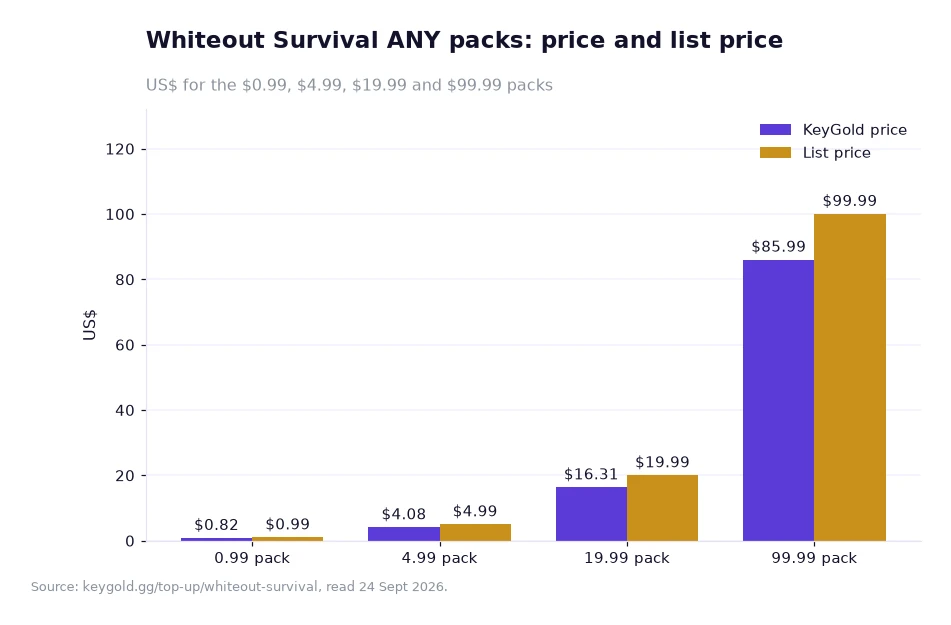
The chart is drawn from this game's own page rather than another title's, and it shows the layout every Whiteout listing uses: a sale price and a list price side by side, band for band. The four ANY rows appear in order — 0.99 at $0.82 beside $0.99, 4.99 at $4.08 beside $4.99, 19.99 at $16.31 beside $19.99, and 99.99 at $85.99 beside $99.99 — with no regional column and no second version for a different storefront. Whatever pack the account routine above was used for, the figure it showed came from that same list.
What the order record gives you afterwards
The Order Record is the quiet part of the system that people appreciate only when something needs checking. Every purchase keeps an entry there, the status is visible without opening the game, and a confirmation email follows when the order completes. For a buyer who has just changed a password, that matters: the fastest way to confirm a delivery is to read the record rather than to sign in and look at the shop.
Support sits alongside it. Live chat is staffed by a real person around the clock, before and after the order, and the store's badges on every game page say the same thing in shorthand: safe and fast, help 24/7, easy refunds, and invite-a-friend coupon rewards. None of that replaces the four steps above, but it means a question at two in the morning is answered by somebody rather than by a form.
Frequently asked questions
Does KeyGold keep my login after the order?
The pages state that the team signs out and clears the login history on its side after delivery. The published advice is to change your password afterwards and to keep two-step verification reachable, sending any code through the order chat only.
What should I do if a verification prompt appears during an order?
Keep the inbox or authenticator tied to the account reachable while the order runs and pass the code through the order chat only. The order status stays visible in your Order Record while it is processed.
Making the next order easier
Once the password is changed and the verification method is in place, the following order takes less thought than the first one: same details, same route, the same 10 to 30 minute delivery window. Start from the whiteout survival frost star buy listing to see the pack ladder, and use the help centre or the contact page if a prompt looks unfamiliar rather than waiting for the order to fail.
Everything quoted here comes from KeyGold's own game pages, read 24 Sept 2026, with prices in USD exactly as the site publishes them.[1]